

Tools needed
-
Version 1.8.0 (or above) of TUC and TRH for your platform
- The Thistle Update Client: A binary to run on the device side to obtain the latest OTA update
- The Thistle Release Helper: A CLI developer tool to prepare and publish OTA releases
- One may also try out TUC and TRH on a web browser using Thistle OTA update demo
-
On the Thistle Control Center App. Visit
the settings section of a project to obtain the API token (“Project Access
Token”) to be used as
THISTLE_TOKENin the configuration step below.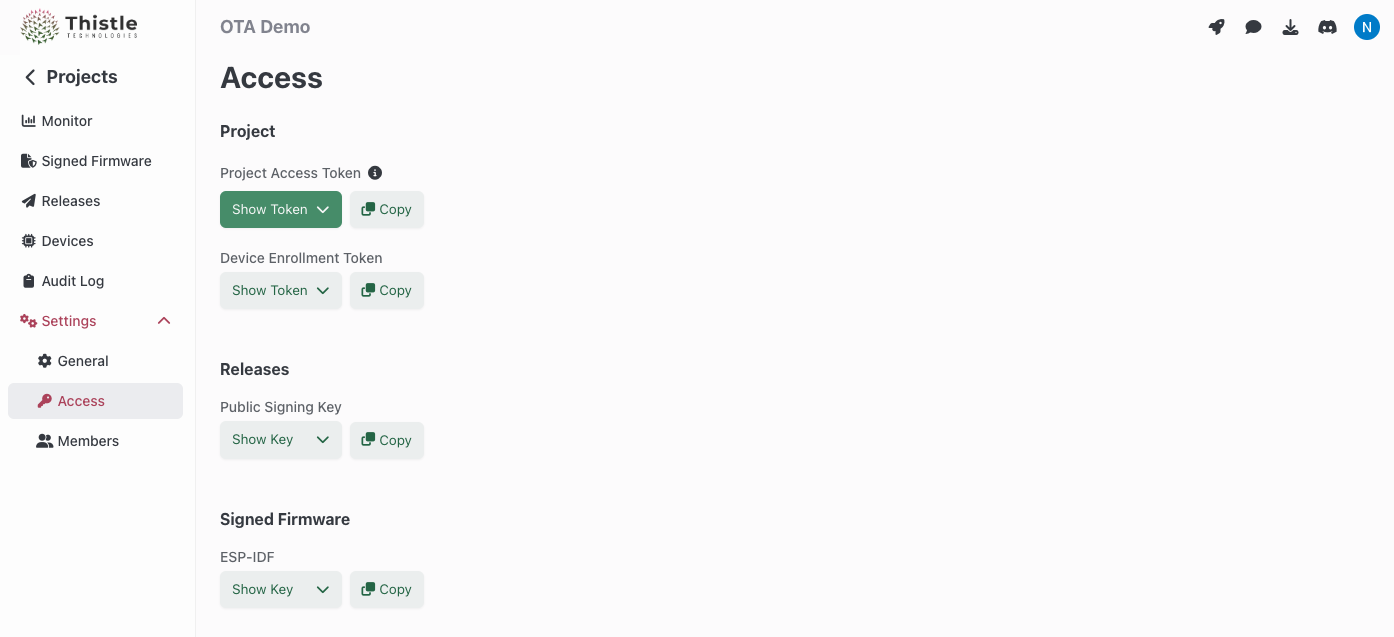
TRH configuration and initialization
Configure your Thistle project’s access token for TRH- Bash
- Windows PowerShell
init
command. This creates a Cloud-KMS-backed OTA update bundle signing key pair on
the Thistle backend, and an OTA update manifest file manifest.json locally in
the current directory, if they do not exist. If they already exist, the public
key portion of the key pair and the latest manifest file will be obtained.
Your local working environment is now ready.
What’s in an encrypted update
We will now package our first encrypted update. For the purpose of this test, the update will contain a single file calledmy_app, that will be installed
at path /tmp/ota/my_app. The --encrypt-ota flag instructs TRH to encrypt
the update artifacts so that only devices provisioned with the correct key
material can decrypt them. Because encrypted OTA operates on a zip archive
bundle, the --encrypt-ota flag must be used together with the --zip-target
flag.
manifest.json will be amended and signed for the encrypted OTA release.
Upload and test deployed release
Now that we have prepared the encrypted update bundle, we can use thetrh tool
to upload the release and its assets.
tuc-config.json for device
pre-enrollment (cf.
Device Pre-enrollment).
tuc-config.json in the current directory. It
configures the client to store persistent data between device reboots in path
~/thistle-ota/. Place tuc-config.json on a device to receive the OTA update,
and run TUC with this configuration. In this guide we will run TUC on the same
machine where TRH is run.
TUC automatically handles decryption of encrypted update artifacts. You can
confirm your file was installed as defined by looking at the install path
/tmp/ota/my_app.
Upload a new encrypted update bundle
To update the manifest we just released with newer content, re-run theprepare and release commands. All the devices using the device
configuration file tuc-config.json will then receive this update.
More options
In this get started guide, we explained the usage of the Thistle Update Client alongside the Thistle Release Helper to perform encrypted OTA updates on a single file - and many more use cases are supported!- File update
- AI model update, with provenance
- AI model update, end-to-end encrypted model
- A/B tested Raspberry Pi 4 update support
- Support for pre & post install scripts
- OTA bundle signing using external signing tools